

Why QuickBooks Desktop to QuickBooks Online Migrations Fail

Throughout the year, I get many requests from clients to help with QuickBooks Desktop to QuickBooks Online migrations. The most challenging ones have involved converting QuickBooks Enterprise Solutions company files, which tend to be very large and complex. Unfortunately, businesses try to do these conversions on their own or even with the help of Intuit support, only to find out after several attempts and hours and hours of support that the migration failed.
It is not very clear as to why a migration fails based on the email received from Intuit, but here are are some of the reasons that I have seen over the years:
The file is too large, or specifically, the total transactions links or targets are too high.
The file is corrupted. Sometimes even rebuilding the QuickBooks file does not work and errors need to be manually fixed.
Negative inventory, issues with FIFO (QBO) vs Average Cost (Desktop).
Missing payroll, year-to date totals not matching, employee information including direct deposit not coming over.
Issues with lists elements such as Customers, Jobs, Vendors, Items, Employees, etc.

It is also important to perform the following necessary pre-migration steps:
● Reconcile all accounts
● Generate key reports (P&L, Balance Sheet, Sales Tax Liability)
● Handle outstanding sales tax liabilities
● Ensure company file is saved locally, and not hosted
● Document workflows
● Identify any add on services, such as:
○ Quickbooks Time
○ Merchant Services
○ Payroll

To ensure a smooth transition from QuickBooks Desktop (any product) to QuickBooks Online, please consider hiring me to help with this process from start to finish. Even before attempting the migration, I can go over the key differences between Desktop and Online and what gets converted and what does not. I can also provide recommendations of specific apps to use for functionality not available or not recommended to use in QuickBooks Online such as complex inventory, syncing eCommerce, importing transactions or payments from 3rd party processors, etc.
This process can take a few weeks to over several months with proper planning, including the actual migration which may take up to 24 hours. This includes training and prepping your employees so that when going live with the successful conversion to QuickBooks Online, the outcome is seamless and painless. We start with a diagnostic charged at a fixed rate to go over your company’s needs and expectations and evaluate your QuickBooks Desktop company file. Then, I can provide a quote that averages around $3,500, higher or lower depending on the results of the diagnosis.

How to Track Mileage in QuickBooks Online

What doesn’t work well
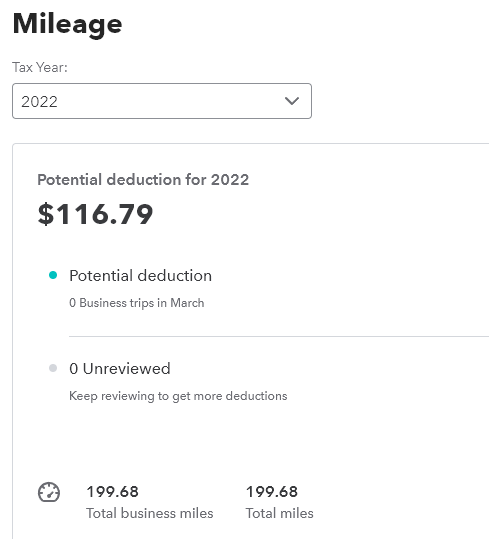
I have tried using the QuickBooks Online (QBO) app on my new Android phone to record trips. Unfortunately, there were a few issues.
It didn’t always record my return trips. I had to log into QBO on the web and manually record the trip.
The app requires you to turn off battery optimization, which I don’t want to do. It also requires location access at any time versus only when using the app. I don’t want to do that either.
You can’t select an actual customer that you met with for the business purpose of the trip.
The miles recorded are inaccurate.
There are no mileage reports.
What I do that is easier and accurate
Before I leave to visit a client, I reset the B Trip odometer to zero in my car.
After I return, I make note of the total miles for the trip or just snap a photo of the odometer reading.
I have created a Mileage service item in QBO with a cost of $0.585, the current IRS mileage rate for 2022.
I create a Bill with myself as the Vendor, the date of the trip as the Bill date, the Mileage item under Item details with the total miles from the trip entered for QTY, and the Customer.
Periodically, I create a Bill Payment and reimburse myself for the business use of my personal car.


Is this the end of QuickBooks Desktop?

It is at least for pricing.
The deadline for purchasing QuickBooks Desktop Pro, Premier, Mac, and Accountant editions for 2021 is December 10, 2021. These one-time licenses will be supported through May 2024, after which they will become sunsetted.
Starting with QuickBooks Desktop 2022 products, an annual subscription will be required. There is no monthly option to pay, but if canceled before the end of the subscription, a pro-rated refund will be provided.
I have been seeing changes in QuickBooks Desktop that are closely resembling QuickBooks Online. For example, there is now a third version of Bank Feeds called Advanced Mode that was implemented in the Desktop 2021 PC versions that looks very similar and functions like the Banking page in QuickBooks Online. It is almost as if Desktop is becoming a hybrid of Windows programming with embedded web pages. This is probably signaling a true end to desktop sometime in the future.