
Cannot Connect Citibank Login (Checking & Credit Card) to More Than One QuickBooks Online Account at a Time.

Since QuickBooks Online started using OAuth to connect with Citibank, I can no longer sync with 2 separate QuickBooks Online accounts. After connecting to one QBO account, it disconnects from my 2nd QBO account. When I reconnect to my 2nd QBO account, it disconnects from the 1st one. I only have this problem with Citibank where it will authorize Intuit as an app to only one QuickBooks Online account at a time. This didn't happen with the older connection type.

I have other cards/accounts with Barclays Bank, Bank of America, Discover that I have connected in both QBO accounts that sync with no problems. I wish that QBO developers would talk to Citibank developers as if I call Citi, they say it's a QuickBooks problem and when I have contacted Intuit, they say it's a Citi problem. I can't believe that I am the only one with 2 QBO accounts (one for business and one for personal) that have the same Citibank accounts in both.
I was finally able to get in touch with someone from Citibank's social media team who was very helpful. Apparently, this is an old "known" issue that still hasn't been fixed by Citibank. They have taken my feedback and forwarded it on, but they said it probably won’t be fixed anytime soon. I would suggest that anyone else that is having the same issue contact Citibank so they can see how many users this is impacting and fix it. I used Twitter as my method of contacting them @AskCiti.
Essentially, Citibank has security settings that will only authorize QuickBooks Online as an app with access unique to one company ID at a time. And even though a new Citi connection uses the newer OAuth protocol, when the connection breaks, the message to Update now in QuickBooks Online implies that it was using the old bank type connection (see image). Citibank needs to be pressured to fix it so that multiple QBO accounts can have access to the same Citi accounts. I would pressure Intuit too to contact Citibank and let them know how to fix this issue, which should be pretty easy since all other banks are able to connect this way. I have a post on the QuickBooks Community that addresses this issue.


Set Up Automatic Reminders For Overdue Invoices in QuickBooks

While not a major update like other updates usually announced in monthly webinars that I regularly attend, this new feature in QuickBooks Online is one that many users have been waiting for. Being able to email invoices and track their read status in QBO has been a game changer. But for small businesses that have a lot of open invoices, going after overdue vendors has been a challenging task. Now it is possible to set up multiple automatic email reminders for invoices.
How to set it up
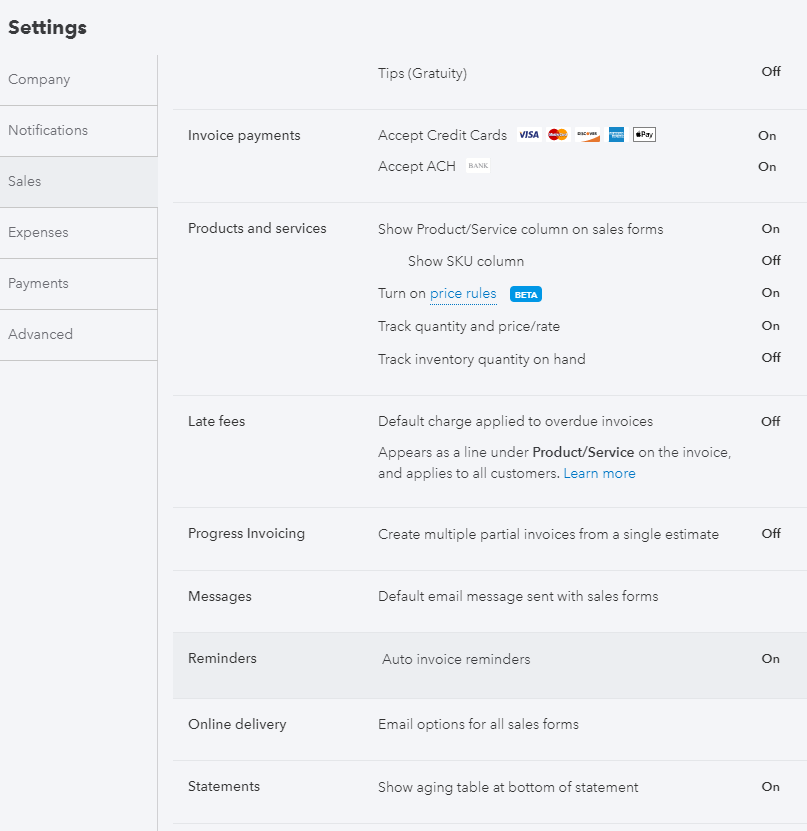
Click on the Gear icon and go to Account and Settings under Your Company.
On the Sales tab, scroll down to Reminders.
Check box for Auto invoice reminders.
You can create up to three automatic reminders. I suggest having one before the due date and the remaining two for overdue invoices.
Click Done.


Import Statements and Reconcile with Attachments in QuickBooks Online

One of my favorite features in Quicken was the ability to attach statements to bank and credit card accounts. When Quicken was sold by Intuit to an investment firm, I converted my Quicken file to QuickBooks Online (QBO). One of the best features in QBO is the ability to attach files, up to 20MB, to each transaction. However, there has been no way to attach statements to any account in the Chart of Accounts like you can attach documents to Customers and Vendors. I requested this feature years ago and while it has not been implemented, the team at Intuit created something even better.

Statement Import
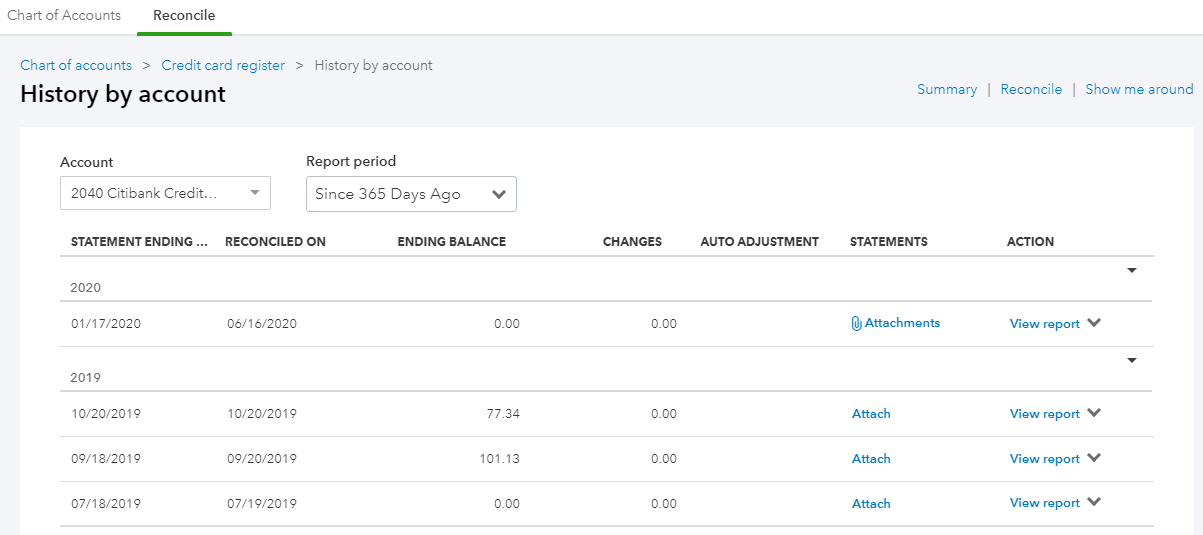
While some features have only been rolled out to some QBO accounts, it looks like bank and credit card accounts connected in Banking will automatically have their bank statements imported into QBO. This is found on the Reconcile screen as shown above. I have not seen any accounts yet that have had statements already imported automatically.

I am assuming this will happen because there is an Unreconciled tab when clicking on the View statements button. This is a wonderful way to help bookkeepers and accountants that reconcile their clients’ accounts in that they will no longer have to ask for statements.
Attach Statements

The View statements button doesn’t show up until after an account has been reconciled (or maybe when statements can be imported automatically) and an attachment has been added after clicking on the Attach statement button.
This pop up shows up on the right side of the History by account screen for the account that was just reconciled. The options to either Drag and drop or browse to upload are the same as other attachments.

This type of attachment is unique in that is not linked to a transaction or list item but rather to an activity, the Reconciliation. I also like how I can add attachments to previous reconciliations. What is currently missing is the ability to batch export (download) attached statements, as they are not listed in the Attachment page. Or it would be nice to be able to do this in History by account screen.