

QuickBooks 2012: New Paths to Better, Faster Financial Management
As it usually does this time of year, Intuit has introduced new versions of its Pro and Premier products. QuickBooks 2012 promises to help you get better organized, save steps, and acquire more in-depth financial insights.
The new
Express Start
is designed for businesses that want to blast through setup and start entering customers and invoices. You have two other options, though:
Advanced Setup
is the old EasyStep interview that solicits more details. You can also open an existing file or convert data from Quicken or other accounting software.
Express Start requires minimal input: company name, industry, company type, tax ID, and contact information. After you save your company file, it lets you start adding or importing customers/vendors/employees, products/services, and bank accounts.
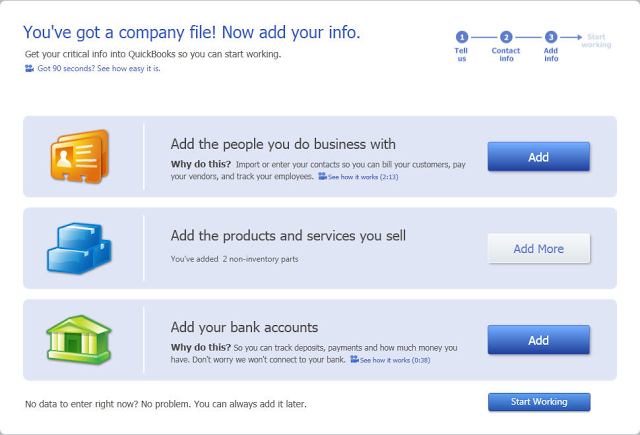
Figure 1: Express Start simplifies company setup.
An Activity-Driven Calendar
QuickBooks'
Reminders
keep you apprised of each day's tasks, but they don't provide any information about the past or future. QuickBooks 2012 solves this problem with its new
Calendar
. When you enter an appointment, to-do, or key business task (invoices, bills, purchase orders, etc.), it appears in the calendar. You can display a graphical view of the month that tallies activities for each day and lists them below. Daily and weekly views are in list form. And links open the original documents.
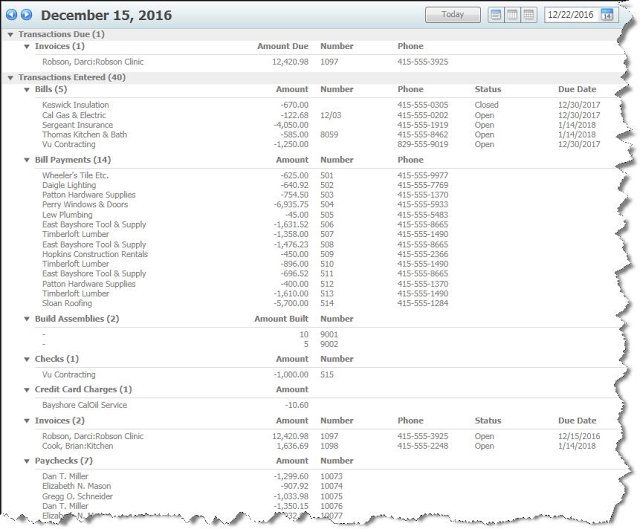
Figure 2: The new
Calendar
displays daily, weekly, and monthly views of your financial transactions.
Save Excel Formatting
Once you've formatted a QuickBooks report in Excel, it's frustrating to have to reformat it each time you run it for different time periods and/or with your ever-changing content.
Excel Integration Refresh
simplifies this process. You can now export a report to Excel, make formatting changes and save them, and then reapply them later to the same type of report using different date ranges and your updated QuickBooks data. Acceptable alterations include:
·
Row and column header font formatting
·
New formulas
·
Renamed column and row headers, and report titles
·
Resized columns
·
Inserted columns and rows
·
Inserted formula text
You can do this by opening your report in QuickBooks and clicking
Update an existing worksheet
, or by launching your report in Excel and clicking the
QuickBooks
tab on the toolbar, then the
Update Report
button.
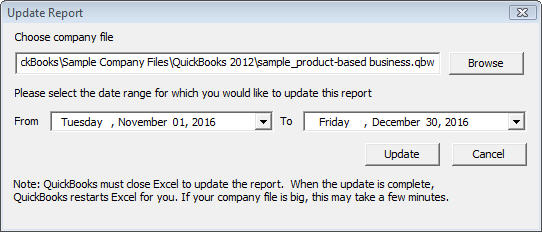
Figure 3: This window opens when you click
Update Report
in Excel.
A New Report Community
There's always room for more report formats. QuickBooks 2012 offers a library of
Contributed Reports
, variations created either by Intuit or your fellow users. You can select one of these, like
Customer Sales By Quantity By Item Detail
and instantly populate it with your own data.
You can sort these templates by industry and rating, and view them as a list, in a grid, or in the Report Center's
Carousel
view.
Centralized Operations
QuickBooks 2012 also saves you time with its new
Centers
. The
Inventory Center
works similarly to those available for customers, vendors, and employees. It's a clearinghouse of item records and transactions that can be viewed and sorted. You can also do inventory housekeeping tasks here, like adding items and launching transactions.
The
Lead Center
helps you carefully track new leads that you either paste in from Excel or enter manually. You can add to-dos and notes to contact records, and convert them into customers.
Upgrading Can Be Tricky
Intuit has included other, smaller time-saving organizational and reporting tools in QuickBooks 2012, like
One-Click Transactions
, which lets you create related transactions from existing ones (i.e., invoice to credit memo) with one click.
There's nothing especially difficult about using most of QuickBooks 2012's new features. But upgrading and setup are sometimes quirky, and the
Excel Integration Refresh
tool has a learning curve. We're happy to help you start your company file on the right foot or get acclimated to this latest version.
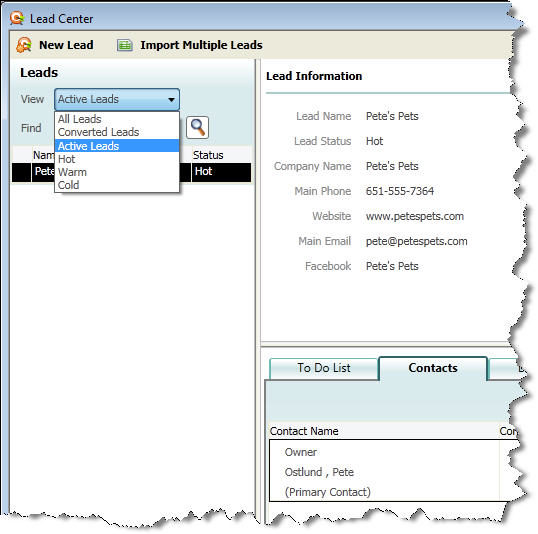
Figure 4; Track your leads and convert them into customers in the new
Lead Center
.

Quick, Easy, & Affordable Payroll with One-Click Import into QuickBooks!
Are you one of many businesses spending too much money on outsourced payroll?
Is your business using ADP or Paychex to process your payroll?
Don't you wish it was easier to import payroll into QuickBooks?
If you answered yes to any of these question, then I have a solution for you!
As a QuickBooks Advanced Certified ProAdvisor, I have been offering to do my clients' payroll for years with an online payroll service provided to me by Intuit, the makers of Quicken and QuickBooks. Each payday, all I need is the employee hours and I take care of the rest. Everything is taken care of including:
Direct deposit with detailed pay stubs
Paycheck printing
Employee online access to pay stubs
All tax calculations and payments
Sick, vacation, and holiday pay accruals
Contractor payments & 1099 filings
Easy-to-read detailed payroll reports
100% accuracy guaranteed
All this and more for less than what you would pay for ADP or Paychex. And if you still want to manage your own payroll, you can still use my online service and pay less than what you are paying for Enhanced Payroll for QuickBooks!
What makes this service even better? Now you can import your payroll into QuickBooks for Windows with just ONE CLICK! I've started using this method and I am very impressed. Forget about exporting and importing spreadsheets or entering confusing journal entries; with just the click of a button, all of your paycheck details, liability payments, and tax accruals come automatically into QuickBooks.
Update 7/15/2020:
I no longer use or support QuickBooks (Intuit) payroll products due to higher prices, abysmal support, and glitches in tax payments and filings. I now offer a much better service.

Take QuickBooks Online and Add Custom Fields, Activities, and More with Method Integration
I am absolutely amazed with this "new" offering that most people are not aware of, what I call QuickBooks on Steroids (but in a good way). I guess I should call it QuickBooks on Supplements to sound more positive. Anyway, a bunch of very smart Canadians finally took the entire accessible QuickBooks database and put it into the cloud, which is to say they brought it online as a web-based application. Now an unlimited number of multiple users can access and view simultaneously lists, transactions, reports, you name it from QuickBooks files imprisoned on the Desktop Computer. You can also create new transactions, customize reports and templates and print directly from the web.
Now the real kicker is that there is an endless possibility to customize and build on top of your QuickBooks data to match your own business' processes. This means you can created unlimited custom fields, activities with calendars, actions that cause other things to happen, and more! But the nice thing is that they have done a lot of the work already by including a CRM to track potential customers as leads, which can then be turned into QuickBooks customers with one click. There is also a Field Service module to schedule and track work orders for contractors working on-site where they can do time-tracking of their time on jobs, enter comments, and re-schedule jobs.
Manage your entire business in one place. With just at least one version of QuickBooks, your business can save tons of time and money by eliminating network hassles, difficult workarounds, and user-license limits. Access your business data anytime, anywhere with a computer, tablet, and even smartphones and iPhones with Internet access.
If you want to see it action with live data and take advantage of special discounted pricing, contact me. As an Advanced Certified QuickBooks ProAdvisor and Method Certified Account Manager, we can provide the best cost-effective solution for your business.
Visit me at Go Get Geek!
Sign up for a Method CRM free trial now!